 Greywire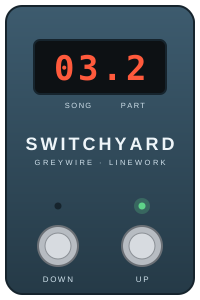
Linework · Control pedal
Switchyard
The control pedal for Linework. Tap through your setlist and every linked pedal changes at once.
Design
A switchyard is where a power grid or rail network routes each line to where it needs to go. That's this pedal's job on your board.
On stage
- Up moves to the next part. After a song's last part, it moves on to the next song.
- Down goes back one part.
- The readout shows the song and part, for example 03.2 for song 3, part 2, so you know where you are without looking at a phone.
- Changes are instant and come from Switchyard's own memory. The phone and the internet aren't needed once the setlist is loaded.
- No hidden press-and-hold tricks: a footswitch does one thing when you press it.
With your phone
Plug your phone (iPhone or Android) straight into Switchyard. The app builds setlists, sets up every pedal for every part, and shows where you are in the set, with bright and dark skins for different stages. You can also jump straight to any song.
When Switchyard has 9V power, it keeps your phone topped up with a slow charge.
Connections
| USB-C | Your phone: setlists, settings and the live position |
|---|---|
| Loop out | To the first Linework pedal (3.5 mm) |
| Loop in | Back from the last Linework pedal (3.5 mm) |
| MIDI out | Program changes for other brands' MIDI pedals (3.5 mm) |
| Power | 9V DC |
We're also planning a version of Switchyard with built-in digital effects such as delay and reverb, added after your analog pedals. More on that as it develops.